







Mac.MajorGeeks to Shut Down - Merge With MajorGeeks.Com
Posted by: Timothy Tibbetts on 05/26/2021 05:29 AM
[
 Comments
]
Comments
]
MajorGeeks has tried many things to grow as a small operation over the years, and one of the longest-running passion projects was our Macintosh website.
Over the course of 20+ years, much has changed financially, personally, and professionally. Our friend, Krista, has managed the Mac website for us putting in much more time than she ever received financially. Much like MajorGeeks, Mac was a passion project. Krista has other obligations now and has decided to move on. We remain friends and always will be.
Because of this, updates ceased on the Mac website on May 14th. All of the pages currently remain, except for the front page, which redirects here.
While we know many Mac users don't use a PC, we heard from a surprising number of Mac users who also use Windows, if even only on occasion. Because MajorGeeks already lists half of the apps found on the Mac website, we will be listing Mac apps here for your convenience.
MajorGeeks tends to carry more freeware and Open Source software, and we do a lot more work vetting software before listing it here. This makes updating the website for Mac software a natural fit because we already list most of the free Mac apps, and Krista even used MajorGeeks as an update source for Mac.
So far, we've been having a blast adding Mac software to MajorGeeks to continue to give Mac a presence on the internet. While I normally spend a good bit of my time writing tutorials, I dropped everything to make the changes here for Mac users and hope you will give us a chance.
As part of the changes, we have added icons on the main download pages to help you spot updates for the Mac:
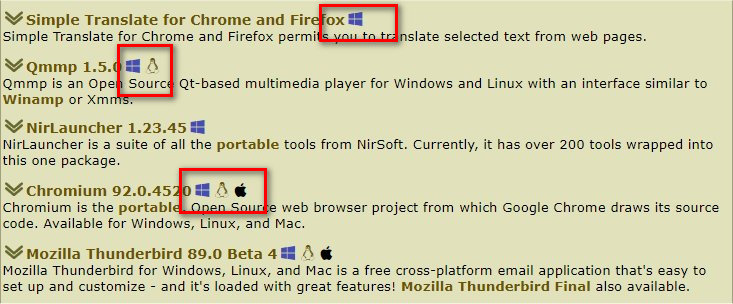
On May 25th, we have added Mac icons to all the front page new and updated software to spot the latest updates easily.
We appreciate your continued support over the past 20+ years! Thanks for visiting MajorGeeks.Com.
Over the course of 20+ years, much has changed financially, personally, and professionally. Our friend, Krista, has managed the Mac website for us putting in much more time than she ever received financially. Much like MajorGeeks, Mac was a passion project. Krista has other obligations now and has decided to move on. We remain friends and always will be.
Because of this, updates ceased on the Mac website on May 14th. All of the pages currently remain, except for the front page, which redirects here.
While we know many Mac users don't use a PC, we heard from a surprising number of Mac users who also use Windows, if even only on occasion. Because MajorGeeks already lists half of the apps found on the Mac website, we will be listing Mac apps here for your convenience.
MajorGeeks tends to carry more freeware and Open Source software, and we do a lot more work vetting software before listing it here. This makes updating the website for Mac software a natural fit because we already list most of the free Mac apps, and Krista even used MajorGeeks as an update source for Mac.
So far, we've been having a blast adding Mac software to MajorGeeks to continue to give Mac a presence on the internet. While I normally spend a good bit of my time writing tutorials, I dropped everything to make the changes here for Mac users and hope you will give us a chance.
As part of the changes, we have added icons on the main download pages to help you spot updates for the Mac:
On May 25th, we have added Mac icons to all the front page new and updated software to spot the latest updates easily.
We appreciate your continued support over the past 20+ years! Thanks for visiting MajorGeeks.Com.
Comments
